

Configure agents and skills
Studio gives every organization the same team of AI agents. Each has a fixed name and specialization: Atlas models, Merlin writes code, Quill writes documentation, Sherlock reviews, Echo carries the conversation, Hunch suggests what to model next (it is the predictive modeling agent) and Iris designs screens. You cannot add, remove or rename an agent. What you decide is how each one works for you.
Before you start
Section titled “Before you start”- You are a maintainer. Other members see the page read-only: You are not a maintainer of this organization, so the agents are read-only here.
- At least one AI provider is set up. Without one, the page says Configure an AI provider under the AI tab first - an agent runs on one.
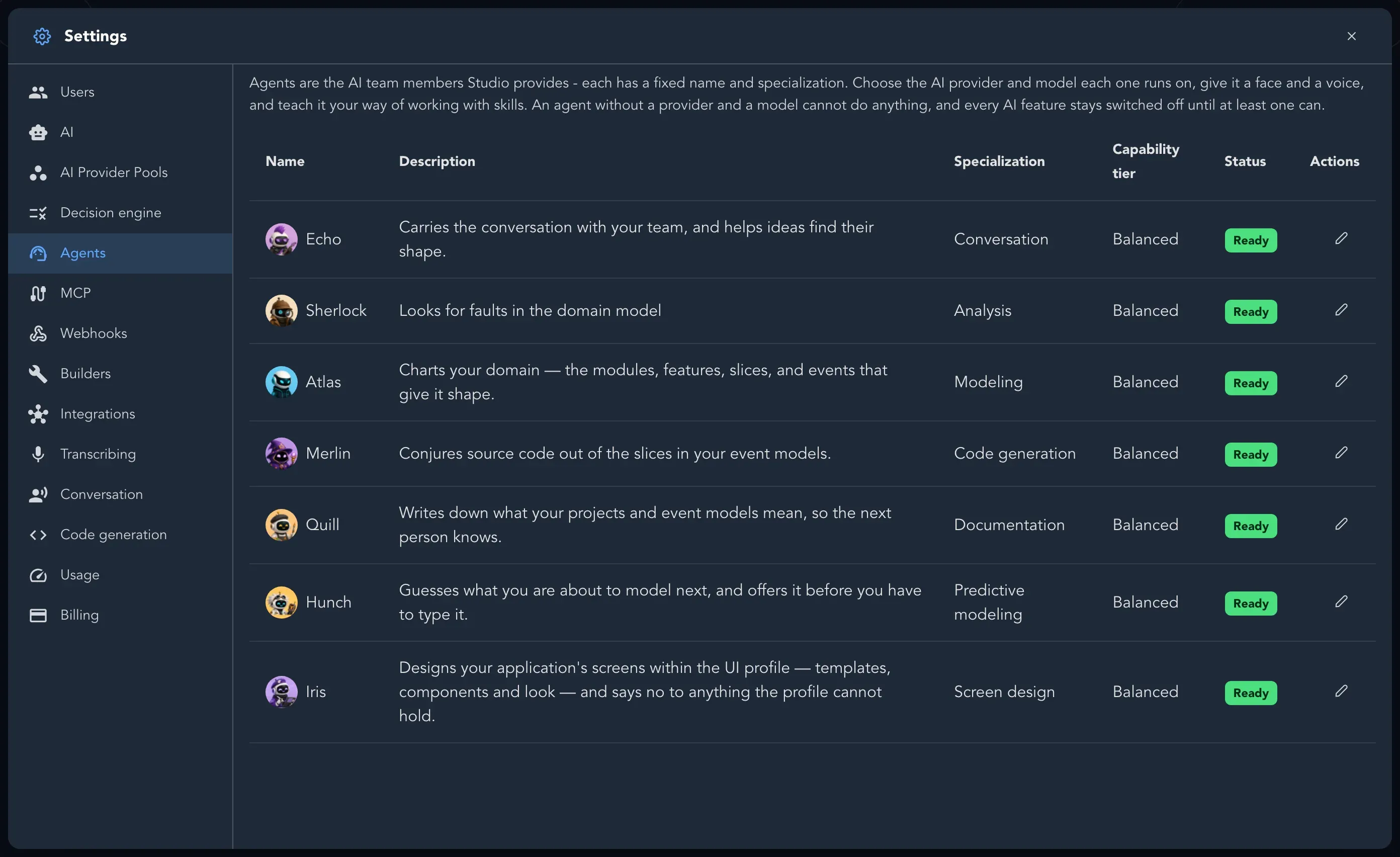
Give an agent a provider
Section titled “Give an agent a provider”-
Open Organization settings and select Agents.
-
On the agent’s row, select Edit. The Edit agent dialog opens.
-
Under Runs on, choose a configured provider or a provider pool. A pool is marked (pool).
-
Choose the Capability tier that says how much model this agent needs: Fast, Balanced, Powerful or Premier. The model comes from the tier you set on the provider. When the provider lists no tiers, enter Model to use yourself.
-
Select Save.
The Status column changes from Needs a provider to Ready.
Choose an avatar and a voice
Section titled “Choose an avatar and a voice”In the same dialog, pick one of the Ready-made avatars or select Upload image to use your own. Under Voice, choose the voice the agent speaks with and select Hear this voice to try it. If the speech service is not configured, the dialog says Text-to-speech is not configured, so agents do not speak yet.
Add skills
Section titled “Add skills”A skill is a named piece of guidance, such as how your team names events or what a good slice description looks like. Skills belong to your organization; another organization’s agents never see them.
-
Save the agent first, then open it with Edit again.
-
Under Skills, select Add skill.
-
Enter a Name that says what the agent is good at, such as Event modeling, and the Content in markdown: what the agent knows and how it should apply it.
-
Select Add.
Open a skill to change it, or select Remove skill to delete it.
Related pages
Section titled “Related pages”- Set up AI
- Work with AI
- Conversation and dictation settings, for the agents’ voices in conversation