

Write specifications
A specification is an example that a slice has to live up to. It reads as a short story in three rows: Given what has already happened, When something happens, Then what the slice does about it. You write it on the slice itself, and Studio runs it for you, so the model is checked before anything is built. For the idea behind specifications, read Specifications and Play.
Before you start
Section titled “Before you start”- Open an event model on an editable board. A read-only board shows specifications but no run results and no notices.
- Have a slice with something to check: a command and the events it produces, an automation, a translator or a read model with a query. A slice with nothing in it cannot be specified.
Add a specification
Section titled “Add a specification”The specifications of a slice sit below it on the board.
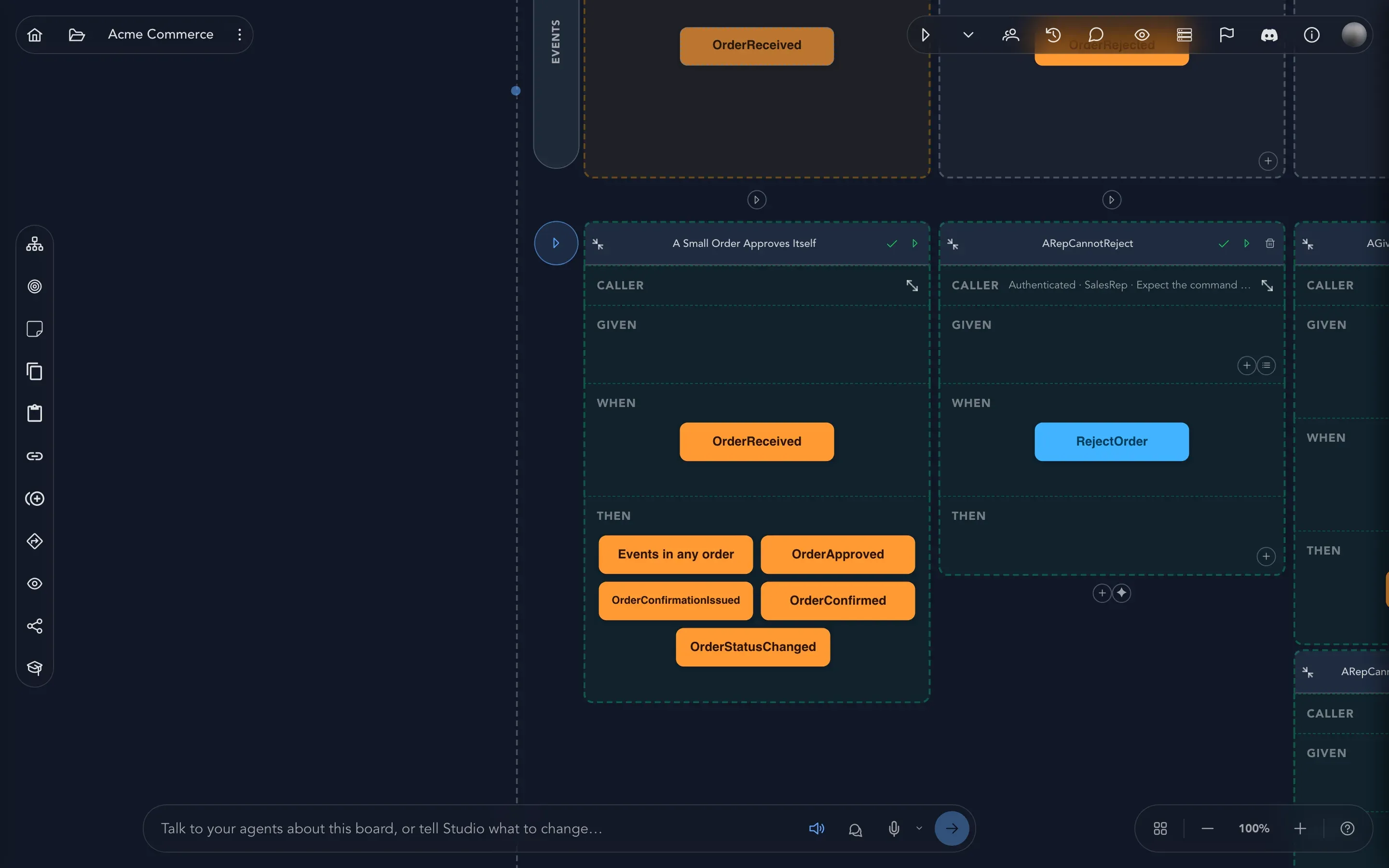
- Select Add Specification under the slice. The new specification gets the first unused numbered name in that slice.
- Rename it to describe the scenario, such as A small order approves itself.
- In the Given row, select Add item to add the events that have already happened, and give them their values. Select Use given context to start from a named starting situation your team has already described (see Given contexts and seed data).
- In the When row, fill in the command with the values it is called with. An automation or a translator has an event here instead, and a state view has a query.
- In the Then row, add what must follow: events, read models or one error.
- Select Run specification.
The add button in each row offers only what that row can hold for this slice, so you cannot put the wrong kind of thing in the wrong place.
Say who is calling
Section titled “Say who is calling”Open the Caller of a specification to say who makes the call:
| Choice | Meaning |
|---|---|
| None | The specification does not say. |
| Anonymous | Nobody is signed in. |
| Authenticated | Anybody who is signed in. |
| Persona | One of your personas. Choose which in Choose a persona. |
| Roles | One or more roles. Add them with Add a role. |
To check that a protected command refuses someone, choose the caller and then Expect the command to be denied. A query has the same choice: Expect the query to be denied. A specification that expects a denial holds no results.
Say what must follow
Section titled “Say what must follow”A specification states either a success or a refusal, never both. Mixing them is refused, because it would not be clear what you are checking.
- Events that the slice appends. If the order does not matter, choose Events in any order.
- Read models, to check the state a read model ends up in.
- Add error for a validation message the command is refused with, or Add rule or constraint error for a rule or constraint you modeled. If the rule is later removed from the model, the specification says Rule no longer defined.
- No events, to say that nothing happens. See When nothing should happen.
Run specifications
Section titled “Run specifications”You can run specifications at three levels:
| Select | What runs |
|---|---|
| Run specification | The one specification. |
| Run this slice’s specifications | Every specification of the slice. |
| Run the specifications of every slice | Every specification on the board. |
Studio runs them in a sandbox and shows a result on each specification: Not run, Running…, Last run succeeded, Last run failed, Last run was inconclusive or Could not run. Select Cancel run to stop one that is going. Open a result with Show the whole result to read the detail, and Copy the result to paste it somewhere. When Studio could not read the model at all, the result gives the line and offers Report this.
A passing specification says the slice behaves as the example expects, in that scenario. It does not say every other scenario works, and it is not a running application. To try the whole model as an application, play it.
Check that it worked
Section titled “Check that it worked”Each specification shows Last run succeeded. If one fails, open the result: it tells you which expectation was not met. Fix the model or the example, and run it again.
What each part checks
Section titled “What each part checks”The sections below are the reference for the less obvious parts of a specification.
Give each specification in a slice a name that stays distinct once the model is generated. Studio ignores punctuation, spaces and capitalization when it compares names, so register author, Register Author and registerAuthor clash. A blank name, or one with only punctuation, becomes Unnamed.
The board shows Clashes with … when generated; rename one. beneath each clashing name, even when the specification is collapsed. Rename one to describe a different scenario. Studio never renames them for you, and an export is refused while two names clash. When AI generates specifications, it skips names that clash with existing ones.
Missing required values
Section titled “Missing required values”Making a command or event property required can leave older specifications incomplete. The board then shows Missing required values beneath the name of each affected specification, and outlines the step that lacks a value. Open that step and enter the value. Nested properties are shown as paths.
The notice follows your changes after a short pause. A missing notice is not proof that a specification is complete: while the check is pending or unavailable nothing is shown, and given contexts, text-only steps and expectations on read models and queries are not marked. Running the specification or previewing the model still reports those.
Query specifications
Section titled “Query specifications”A state view can be specified through one of its queries instead of its projection. In the When row, select Add query and choose the query. The specification then reads: Given these read models, When this query is run with these arguments, Then the result is these read models.
- When shows the query as its own card. Open it to set one argument for each parameter. A query without parameters has nothing to open.
- Given holds read models only, and you can add several. Select Define read model as given state and fill in their values.
- Then holds the results. Add result adds one. A query that returns one item takes exactly one result. A query that returns a list takes as many as you add, in the order they must come back.
A specification holds a query or a command, never both. Choosing a query is refused while the specification already holds a command, events, a returned value or a redelivery.
Generated identifiers and values
Section titled “Generated identifiers and values”Some values are not typed in by whoever runs a command: a receipt number, a reference, an identifier the command creates. Mark the property as Generated in the command’s schema editor, and the generated application creates it. A required identifier can also be marked Key and Generated: the key is what the command acts on, and a specification does not have to supply it.
A specification cannot predict a generated value, so it pins one. Open the command in the When row and enter the value for the generated property. The run uses it in place of the one the command would create, so the Then row can state the exact value. The command’s key is never pinned: the value you enter for it stays an entered value. When a property stops being generated, its pinned value is cleared on the next save.
Only some properties can be generated: a unique identifier, or a text concept with a generation strategy. A plain number, date or text without a strategy cannot, and saving the schema refuses it.
When nothing should happen
Section titled “When nothing should happen”No events in the Then row says the slice must append nothing, and the run fails if it appends anything. An empty Then row does not say this. It means you have not yet written the outcome, so Studio never reads an empty row as “nothing happens”.
Use it when:
- a command is a retry or does nothing new, such as confirming an order that is already confirmed;
- an automation ignores an event it should ignore, such as a reaction that only acts above a threshold.
It is offered on state change, automation and translator slices, and only while Then is empty. It cannot be combined with events or errors: remove those first, or remove No events before adding them. A state view never offers it. Remove the card with its remove button to go back to an empty row.
When a fact arrives twice
Section titled “When a fact arrives twice”After a failure, an event can reach an automation or a translator more than once. Redeliver a given event in the When row tells the slice’s reaction about one of the specification’s own given events again. The row reads when Event is redelivered to Slice. Pair it with Then to say what happens the second time: the same follow-up again, or, with No events, nothing.
Studio offers it only when all of these hold:
- the slice is an automation or a translator;
- the specification has at least one given event, and the redelivered event is one of them;
- the reaction observes that event. A reaction on a timer, or with a custom trigger and no events read, observes none; change the slice’s trigger first;
- the When row holds no command with values. A redelivery is the whole When, and a command with values must be removed first.
Remove the redelivery with its remove button to choose again. Removing the given event it points at also removes the redelivery.
An exported Screenplay file states the redelivery only when it can pick out exactly one given occurrence. A specification that gives the same event twice with identical values leaves nothing to pick out, so the export leaves the redelivery out and says so in its warnings. Give the occurrences different values to keep it.
Example: an automation sends a receipt when an order is placed, and a recovery redelivery must not send a second one.
- Add a specification and give it the Order placed event in Given.
- In When, choose Redeliver a given event and pick Order placed.
- In Then, choose No events.
- Select Run specification.
Related
Section titled “Related”- Specifications and Play: the idea behind the examples.
- Given contexts and seed data: reusable starting situations.
- Export a model: specifications travel with the Screenplay file.